


More Impact,
More Income
AS FEATURED



We Offer Several Formatting Services for Non-Fiction Authors...
Choose the Level that Serves You Best
Congratulations! Your manuscript has been fully edited and proofread and it's time to get it ready for print! Before uploading your manuscript and paying for a proof copy to check quality, it's important to ensure that
you properly format your print book interior files. Interior formatting is critical to insure that you're book
sits properly inside the template. This process is done to make sure your every single page is readable,
professional and consistent.
Formatting includes page size, font size and font type, line spacing, paragraph composition, page numbering, margins, bleed, gutter, and page breaks, chapter title presentation, and image sizing and positioning.
Formatting Choices Made Simple!

Basic Formatting
Your book will be formatted using our template of your choice, including up to 10 images charts, graphs, endnotes, footnotes, etc.
Price: $1.33/page* (minimum $90) Delivery: 10 Business Days
Medium Editing
Your book will be formatted using our template of your choice, including between 11 to 25 images, charts, graphs, endnotes, footnotes, etc.
Price: $1.50/page* (minimum $100) Delivery: 15 Business Days
Complex Formatting
Your book will be formatted using our template of your choice, including books that have more than 25 images charts, graphs, endnotes, footnotes, etc.
Price: $1.94/page* (minimum $130) Delivery: 15 Business Days
Note: If there are more than 50 images, there will be an additional charge of $1 per image.
Formatting Rates
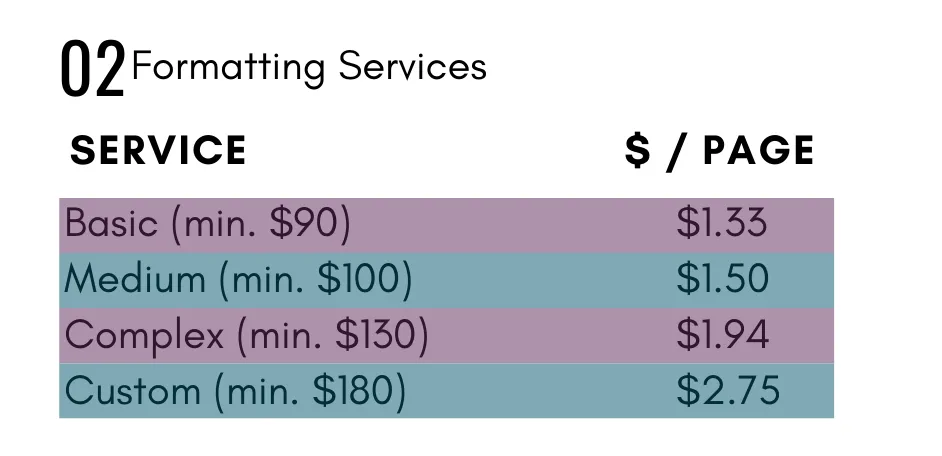
*Our “per page” rates for editing, formatting and eBook creation are based on the average number of words per page in a non-fiction book, which is roughly 250. To determine your page count, find your total word count in the Review tab in Microsoft Word and divide that number by 250. Use the resulting number as your quantity for page count.
The EXACT System I use to create "OMG, gotta have it" offers that have my audience clawing at their credit cards ... every time!